> ## Documentation Index
> Fetch the complete documentation index at: https://docs.pretium.africa/llms.txt
> Use this file to discover all available pages before exploring further.
# Introduction
> Pretium — move value between stablecoins and African fiat rails.
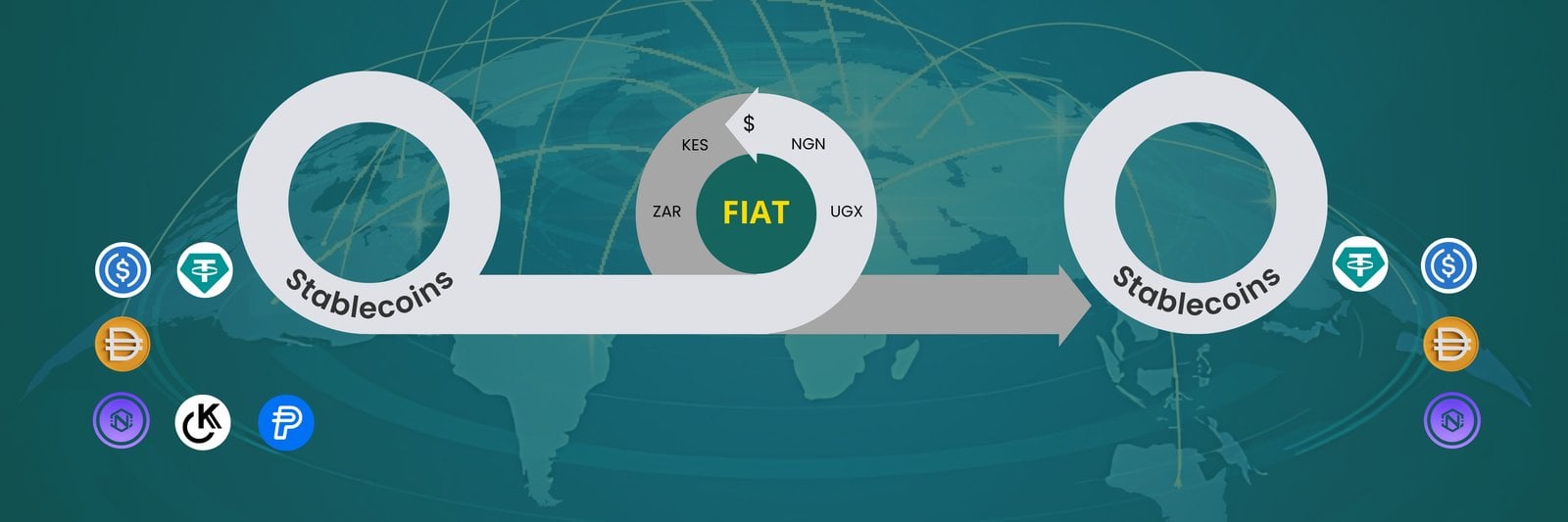 Pretium (served at `{{base_url}}`) lets partners collect and disburse fiat across African markets, settle with stablecoins on-chain, and run hosted checkout. For AI assistants, add Pretium as an [MCP server](/guides/agents) in Cursor, Claude, or ChatGPT — no REST agent integration required.
## Onboarding process
To begin your onboarding journey, complete this quick [form](https://docs.google.com/forms/d/1MWxinUbcGBOYJxaEZMCYJCJhBxrlNozAWYvwctFJtHY/edit) to get started, or book a meeting [here](https://calendly.com/pretium-finance) with our team for a walkthrough or to address any questions you may have.
Once we get your details, our onboarding specialists will guide you through **the setup, verification, and integration of your account and API**.
Once onboarded, you'll receive your **API credentials** and **sandbox access** to test crypto transactions securely.
## What you can build
Convert on-chain stablecoin payments into mobile money or bank payouts.
Collect local fiat and settle stablecoins to a wallet address.
Hosted settlement flow with a checkout key and order lifecycle.
Add Pretium in Cursor, Claude, or ChatGPT and let agents pay via MCP tools.
## Supported markets
| Currency | Country | Prefix |
| -------- | -------- | --------------------- |
| KES | Kenya | `/kes`, `/v1/.../KES` |
| UGX | Uganda | `/ugx` |
| NGN | Nigeria | `/ngn` |
| GHS | Ghana | `/ghs` |
| MWK | Malawi | `/mwk` |
| CDF | DR Congo | `/cdf` |
| ETB | Ethiopia | `/etb` |
| TZS | Tanzania | `/tzs` |
| ZMW | Zambia | `/zmw` |
| RWF | Rwanda | `/rwf` (utilities) |
## API surfaces
| Surface | Base path | Auth header value |
| ------------------------- | --------------------------- | ------------------------------------------- |
| Unified payments | `/v1`, `/v2` | Partner `consumer_key` |
| Account | `/account` | Partner `consumer_key` |
| Collection & disbursement | `/{currency}` | Partner `consumer_key` |
| Checkout | `/v1/checkout` | Partner `checkout_key` |
| AI agents | [MCP guide](/guides/agents) | MCP server (`mcp.pretium.africa`), not REST |
Almost all partner Pretium endpoints are **POST** with a JSON body.
## Response envelope
Successful and error responses share a consistent shape:
```json theme={null}
{
"code": 200,
"message": "Exchange rates",
"data": {}
}
```
Errors omit `data` and use `400`, `401`, `403`, or `404` in both the HTTP status and `code` field.
## Next steps
Make your first authenticated request in under five minutes.
How API keys and checkout keys work for Pretium.
Pretium (served at `{{base_url}}`) lets partners collect and disburse fiat across African markets, settle with stablecoins on-chain, and run hosted checkout. For AI assistants, add Pretium as an [MCP server](/guides/agents) in Cursor, Claude, or ChatGPT — no REST agent integration required.
## Onboarding process
To begin your onboarding journey, complete this quick [form](https://docs.google.com/forms/d/1MWxinUbcGBOYJxaEZMCYJCJhBxrlNozAWYvwctFJtHY/edit) to get started, or book a meeting [here](https://calendly.com/pretium-finance) with our team for a walkthrough or to address any questions you may have.
Once we get your details, our onboarding specialists will guide you through **the setup, verification, and integration of your account and API**.
Once onboarded, you'll receive your **API credentials** and **sandbox access** to test crypto transactions securely.
## What you can build
Convert on-chain stablecoin payments into mobile money or bank payouts.
Collect local fiat and settle stablecoins to a wallet address.
Hosted settlement flow with a checkout key and order lifecycle.
Add Pretium in Cursor, Claude, or ChatGPT and let agents pay via MCP tools.
## Supported markets
| Currency | Country | Prefix |
| -------- | -------- | --------------------- |
| KES | Kenya | `/kes`, `/v1/.../KES` |
| UGX | Uganda | `/ugx` |
| NGN | Nigeria | `/ngn` |
| GHS | Ghana | `/ghs` |
| MWK | Malawi | `/mwk` |
| CDF | DR Congo | `/cdf` |
| ETB | Ethiopia | `/etb` |
| TZS | Tanzania | `/tzs` |
| ZMW | Zambia | `/zmw` |
| RWF | Rwanda | `/rwf` (utilities) |
## API surfaces
| Surface | Base path | Auth header value |
| ------------------------- | --------------------------- | ------------------------------------------- |
| Unified payments | `/v1`, `/v2` | Partner `consumer_key` |
| Account | `/account` | Partner `consumer_key` |
| Collection & disbursement | `/{currency}` | Partner `consumer_key` |
| Checkout | `/v1/checkout` | Partner `checkout_key` |
| AI agents | [MCP guide](/guides/agents) | MCP server (`mcp.pretium.africa`), not REST |
Almost all partner Pretium endpoints are **POST** with a JSON body.
## Response envelope
Successful and error responses share a consistent shape:
```json theme={null}
{
"code": 200,
"message": "Exchange rates",
"data": {}
}
```
Errors omit `data` and use `400`, `401`, `403`, or `404` in both the HTTP status and `code` field.
## Next steps
Make your first authenticated request in under five minutes.
How API keys and checkout keys work for Pretium.